


Showing posts with label intro. Show all posts
Showing posts with label intro. Show all posts
Sunday, January 1, 2017

Thursday, September 8, 2016
GlobalMedicine Wordpress
Customized Solutions for Global Medical Information
 Clients tell us that we provide a flexible, responsive, and personable experience for them. And at ProPharma Group, those clients come from all over the world.
With strategically positioned contact centers around the world, we can provide a truly global solution to the medical information (MI) needs of pharmaceutical, biotechnology, and medical device companies.
By outsourcing pharmaceutical contact center services to ProPharma Group, our clients are able to alleviate challenges associated with developing and maintaining an internal department. Our five globally integrated, international contact centers are staffed with pharmacists, nurses, and life science graduates, many with advanced degrees. The inquiries they handle come from health care professionals, patients, and consumers all over the world.
With ProPharma Group as a partner, you can provide your customers with:
- Industry experienced medical information specialists to manage each case accurately and professionally
- Multi-lingual support in approximately 30 native languages
- A globally integrated, validated database
- Support for a single product or therapy area, a product cluster, or your full product portfolio
- Medical information responses consistent with product labeling and regulatory guidance
- Experience in a diverse range of therapeutic categories
- Adverse event processing and product complaint services
Our Professional Contact Centers are located in:
- Overland Park, Kansas
- St. Louis, Missouri
- St. Paul, Minnesota
- Richmond, United Kingdom
- Melbourne, Australia
Tuesday, September 6, 2016
html5 book part 1 tricks
Arnautweb
Nearly every section of the book contains practical code examples that demonstrate real-world use (A and B). Typically, they are coupled with screen shots that show the results of the code when you view the Web page in a browser C. Most of the screen shots are of the latest version of Firefox that was available at the time. However, this doesn’t imply a recommendation of Firefox over any other browser. The code samples will look very similar in any of the latest versions of Chrome, Internet Explorer, Opera, or Safari. As you will learn in Chapter 20, you should test your pages in a wide range of browsers before putting them on the Web, because there’s no telling what browsers your visitors will use. The code and screen shots are accompanied by descriptions of the HTML elements or CSS properties in question, both to give the samples context and to increase your understanding of them. In many cases, you may find that the descriptions and code samples are enough for you to start using the HTML and CSS features. But if you need explicit guidance on how to use them, step-by-step instructions are always provided. Finally, most sections contain tips that relay additional usage information, best practices, references to related parts of the book, links to relevant resources, and more.

You’ll find a snippet of HTML code on many pages, with the pertinent sections highlighted. An ellipsis (...) represents additional code or content that was omitted for brevity. Often, the omitted portion is shown in a different code
<body>
<header role="banner">
<nav role="navigation">
<ul class="nav">
<li><a href="/" class="current">home</a></li>
<li><a href="/about/">about</a></li>
<li><a href="/resources/">resources</a></li>
<li><a href="/archives/">archives</a></li>
</ul> </nav> ... </header>
</body>
</html>
Conventions used in this book The book uses the following conventions: n The word HTML is all encompassing, representing the language in general. HTML5 is used when referring to that specific version of HTML, such as when discussing a feature that is new in HTML5 and doesn’t exist in previous versions of HTML. The same approach applies to usage of the terms CSS (general) and CSS3 (specific to CSS3). n Text or code that is a placeholder for a value you would create yourself is italicized. Most placeholders appear in the step-by-step instructions. For example, “Or type #rrggbb, where rrggbb is the color’s hexadecimal representation.” n Code that you should actually type or that represents HTML or CSS code appears in this font. n An arrow (➝ ) in a code figure indicates a continuation of the previous line—the line has been wrapped to fit in the book’s column B. The arrow is not part of the code itself, so it’s not something you would type. Instead, type the line continuously, as if it had not wrapped to another line. n The first occurrence of a word is italicized when it is defined. n IE is often used as a popular abbreviation of Internet Explorer. For instance, IE9 is synonymous with Internet Explorer 9. n Whenever a plus sign (+) follows a browser version number, it means the version listed plus subsequent versions. For instance, Firefox 8+ refers to Firefox 8.0 and all versions after it.
Nearly every section of the book contains practical code examples that demonstrate real-world use (A and B). Typically, they are coupled with screen shots that show the results of the code when you view the Web page in a browser C. Most of the screen shots are of the latest version of Firefox that was available at the time. However, this doesn’t imply a recommendation of Firefox over any other browser. The code samples will look very similar in any of the latest versions of Chrome, Internet Explorer, Opera, or Safari. As you will learn in Chapter 20, you should test your pages in a wide range of browsers before putting them on the Web, because there’s no telling what browsers your visitors will use. The code and screen shots are accompanied by descriptions of the HTML elements or CSS properties in question, both to give the samples context and to increase your understanding of them. In many cases, you may find that the descriptions and code samples are enough for you to start using the HTML and CSS features. But if you need explicit guidance on how to use them, step-by-step instructions are always provided. Finally, most sections contain tips that relay additional usage information, best practices, references to related parts of the book, links to relevant resources, and more.
You’ll find a snippet of HTML code on many pages, with the pertinent sections highlighted. An ellipsis (...) represents additional code or content that was omitted for brevity. Often, the omitted portion is shown in a different code
<body>
<header role="banner">
<nav role="navigation">
<ul class="nav">
<li><a href="/" class="current">home</a></li>
<li><a href="/about/">about</a></li>
<li><a href="/resources/">resources</a></li>
<li><a href="/archives/">archives</a></li>
</ul> </nav> ... </header>
</body>
</html>
The book’s site, at www.bruceontheloose .com/htmlcss/, contains the table of contents, every complete code example featured in the book (plus some additional ones that wouldn’t fit), links to resources cited in the book (as well as additional ones), information about references used during writing, a list of errata, and more. The site also includes reference sections (Appendixes A and B) that we didn’t have room to include in the book. These are handy for quickly looking up HTML elements and attributes or CSS properties and values. (They also contain some information not covered in the book.) You can find the code examples at www .bruceontheloose.com/htmlcss/examples/. You can browse them from there or download them to your computer—all the HTML and CSS files are yours for the taking. In some cases, I’ve included additional comments in the code to explain more about what it does or how to use it. A handful of the code samples in the book are truncated for space considerations, but the complete versions are on the book’s Web site. Please feel free to use the code as you please, modifying it as needed for your own projects. The URLs for some of the key pages on the book’s site follow: n Home page: www.bruceontheloose .com/htmlcss/ n Code samples: www.bruceontheloose .com/htmlcss/examples/ n Appendix A: HTML Reference: www.bruceontheloose.com/ref/html/ n Appendix B: CSS Properties and Values: www.bruceontheloose.com/ref/css/ I hope you find the site helpful.
Video Training Visual QuickStart Guides are now even more visual: Building on the success of the top-selling Visual QuickStart Guide books, Peachpit now offers Video QuickStarts. As a companion to this book, Peachpit offers more than an hour of short, task-based videos that will help you master HTML5’s top features and techniques; instead of just reading about how to use HTML5, you can watch it in action. It’s a great way to learn all the basics and some of the newer or more complex features of HTML5. Log on to the Peachpit site at www.peachpit.com/ register to register your book, and you’ll find a free streaming sample; purchasing the rest of the material is quick and easy.
Unless a site is heavy on videos or photo galleries, most content on Web pages is text. This chapter explains which HTML semantics are appropriate for different types of text, especially (but not solely) for text within a sentence or phrase. For example, the em element is specifically designed for indicating emphasized text, and the cite element’s purpose is to cite works of art, movies, books, and more. Browsers typically style many text elements differently than normal text. For instance, both the em and cite elements are italicized. Another element, code, which is specifically designed for formatting lines of code from a script or program, displays in a monospace font by default. How content will look is irrelevant when deciding how to mark it up. So, you shouldn’t use em or cite just because you want to italicize text. That’s the job of CSS. Instead, focus on choosing HTML elements that describe the content. If by default a browser styles it as you would yourself with CSS, that’s just a bonus. If not, just override the default formatting with your own CSS.
Monday, September 5, 2016
Make Money With CAMPCASH

Camp Cash: Island Edit
Edit
The very first season in the "Camp Cash" series features sixteen contestants fighting for the grand prize of one million dollars, and risking their lives in deadly, and not so deadly challenges, courtesy of the hostess Blaineley. Who will win? Who will lose? And who will cry? Will it be the Sweet Shadow Ariel, her twin the Main Event Kia, the Laid-Back Guy Trevin, the Hot Tech Geek Zyeb, the Sugar, Spice, and Everything Nice Cassy, the Weird Guy Geo, the Girl On Fire Glenda, the Ditzy Sweetheart Vanilla, the Artist Chance, the Braniac Violet, the Olympian Atlas, the Athlete Derek, the Warrior Sareena, the Sidekick Dina, the Jock Cole, or the Sarcastic Know-It-All Marc? Or will Blaineley just take it for herself? Find out on Camp Cash: Island!
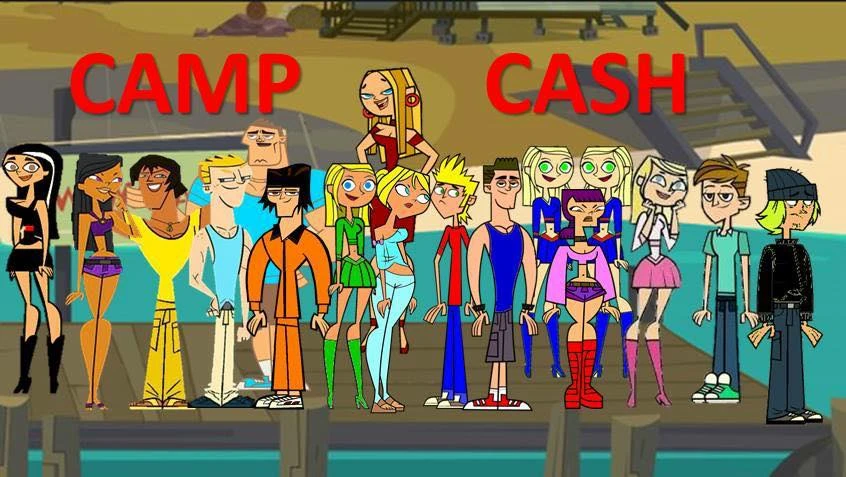
The first season cast.
Camp Cash ActionEdit
Some of your favorite contestants are coming back for another shot for the million, and Blaineley has been coming up with new movie-themed ideas to torture the contestants and shake things up. Who will live? Who will die? Who will win? Who probably won't? Find out on Camp Cash Action!
EventsEdit
2015Edit
- On Sunday, May 17th: Blaineley was revealed as the hostess. Later that day, Vanilla was the first contestant revealed.
- On Tuesday, May 19th: a few rejected character designs were revealed. Some of these names include Dak, Stefani, Ariana, Amethyst, Sapphire, Bella, Alice, Peter, Agnes, Summer, Karriey, and Roke. Also, prototype designs of Ariel and Kia appeared in this photo. Additionally an extra name appeared in this picture.
- On Wednesday, May 20th: Cassy was officially revealed as a contestant, a "Q&A" session will happen for all the contestants, and that past Total Drama contestant Cody will appear sometime during the series span, but will not be a contestant.
- On Thursday, May 21st: Marc was officially revealed. He is revealed to have an arch-nemesis and beinghead over heels in love.
- On Friday, May 22nd: A few more rejected character designs were shown. They include Britney, Lavender, Gage, Shaynina, Daryl, Taylor, Wednesday, Destiney, Ricky, Andrew, Kenny, Oliver, and Corey. Andrew is confirmed to not be related to any contestant, but an enemy of Tyler's who's on the same soccer team as him and his competitive rival.
- On Saturday, May 23rd: Violet was officially revealed, and her dream of being an empress. A team roster was officially released, confirming the team names as the Killer Gophers and the Screaming Bass. Cole's name was also accidentally revealed again in an uncomplete roster.
- On Sunday, May 24th: Trevin was officially revealed, with the artwork done by Drake Daniels.
- On Tuesday, May 26: A list of dialogues were revealed for some contestants. All revealed characters received these, while Cole and Blaineley did not have any dialogue revealed.
- On Wednesday, May 27: A Q&A session with Ariel was released.
- On Thursday, May 28th: A Q&A session with Kia was released by popular demand, and it was confirmed that Ariel will not win the first season.
- On Friday, June 12: It was announced that the first season of Camp Cash, Camp Cash: Island, will be put on hold until the first episode of The Ridonculous Race officially airs, and Clarity from Camp Cash Actionwas revealed early as an apology.
- On Saturday, July 4: Much information was revealed to fan Skyler Elmore. It was revealed that the series has the first six season contestants, teams, and elimination orders done. It was revealed that Chris Wiltrout (the creator) wants at least nine seasons. It was revealed that Sareena would not win the first season, but is one of Chris' favorite contestants.
- On Thursday, July 16th: Tanya, Michael, Marie, and Chris were revealed early. In Tanya's case: VERY early. And a line from Tanya's biography was revealed, meaning that she will be receiving a biography.
- On Friday, December 25th: Glenda was revealed.
2016 Edit
- On Sunday, June 5th, the first episode premiered.
Thursday, September 1, 2016
IS OR NOT IS THE CHAMPCASHE THE FAKE SITE
MLM / CHAIN MONEY
Is Champcash app new form of chain-money scheme?
The Champcash app on Google Play store, wants you to install 10 other apps and refer it to others to earn unlimited money, similar to money circulations scams
Champcash, a mobile app from Champion Networks Pvt Ltd, is found luring several Android mobile users, under the pretext of providing opportunity to earn unlimited money, free. However, after checking its business model, Champcash appears more like a chain-money, operating without permission from the regulators.
"Champcash is an Android Application Through which Anyone Can be a Millionaire By Just Installing Some Apps in Mobile. Just Refer Champcash to Your Friends and Ask them to Complete the Challenge By installing 8-10 Apps in their Android phone, You will Get its payment instantly," the company says on its website.
The app is listed under entertainment on Google Play and its title is "Champcash Earn Money Free". Here is says, "Funda is Simple, We are Giving Money of Advertisement. Users Installs the Apps and Advertisers Pay us and We Pay Users. You can Earn Unlimited without investing any money..."

This may sound good for a gullible person in need of free money, but remember, it is not as easy as it sounds. There are two serious issues with this claim from Champcash. One, there is no clarity on which 10 apps that a user is bound to install, open and use for at least a minute and second, why would an advertiser pay money to anyone for installing a third party apps? Also, if Champcash app is free, then why the user needs to punch in a sponsor ID?
It may sound to be a funny coincidence, but the usage of language and grammar on Champcash app on Google Play store and its own website, is more like the spam emails from fraudsters offering lottery money. (Read: RBI offering unclaimed funds through lottery? Beware, scamsters are on the prowl again )
Another issue is, how does the company claim to distribute money? Champcash says, "Other Companies are Giving money directly to their Users if they install Apps in their Phone. We Have Changed this Scenario, we are not giving any Money to the User who is Installing Apps in his phone But we are Distributing that money in Whole Network."

Now, I have been using, testing several mobile apps since past several years, and have yet to come across anyone who offers money to install an app. It is the other way around. If you use free apps, then there may be some advertising popping up while you use it. And if it is a paid version, then there would not be any advertisement besides providing your some more features of the app.
Since Champcash claims to receive and distribute money to everyone who uses its app, we asked a few questions around. First, we asked regulators, if Champcash is registered with them, since it is in money circulation business. In an email reply, an official from the Reserve Bank of India (RBI) clarified, "The company (Champcash or Champion Networks Pvt Ltd) is not registered with us - neither as an authorised entity under Payment and Settlement Act nor as an NBFC."
At the same time, we also sent some questions to Champcash, which are yet to be answered by the company. Here are the questions we asked...
- What is the churning ratio of Champcash users? On an average, how many users join and leave (uninstall) the app in a 12-months period? What is the user retention rate in this line of sponsorship?
- What is the average amount, a user typically earns in a month/year?
- How many users earn less than $100 as reference fee in a year?
- What is the maximum amount a user had earned in a year through referring Champcash app?
- What are the chances that someone who starts from scratch and earns a $1 million Champ Cash?
- Does the business module really free people from their jobs or have they just replaced their job with another that has more risk?
- Does the Champcash really allow the leaders more time with their families?
- Which are the apps that are referred for users by Champcash?
- What information is obtained by Champcash and the other installed apps from user's mobile phone?
- Kindly tell us names of advertisers, who are ready to pay $2 just for installing and using a third party app for a minute?
- How many advertisers are enrolled in Champcash programme?
- How many apps developers had partnered with Champcash programme?
- Who are the top executives at Champcash?
- Is there any specific reason, your domain Champcash.com is registered under proxy and all details like owner, contact info are kept hidden?
- Is Champion Networks Pvt Ltd registered with any regulator like the RBI, since it is involved in payouts? Also how much TDS is deducted on the payouts and deposited to the I-T Dept by Champcash?
Thursday, August 25, 2016
How to create affiliate from your Blogger
How To Create Your Own Affiliate Blog by Arnautweb
Ready to learn how to make your own affiliate blog?
(FYI: This post is chapter 2 of the mega-guide "5 Ways To Create A Profitable Affiliate Site")
Blogs monetized through affiliate sales are another very common business model.
They take a lot more work than some of the other models but the rewards can be worth it considering just how much some bloggers make as you'll find out below.
I evaluate how to create your own successful blog below....

Content
- How To Create Your Own Profitable Affiliate Blog
- Pro's of Affiliate Blogs
- Con's of Affiliate Marketing Blogs
- How These Sites Deliver Value
- Examples of Successful Affiliate Blogs
- How You Can Create Your Own Profitable Affiliate Blog
- What You'll Need To Get Started
- Affiliate Blog Summary
- Go to chapter 3: How To Create Your Own Niche Comparison Site >>>
How To Create Your Own Profitable Affiliate Blog
So we all know what a blog is. You're reading one. Read how to make an epic blog here.
Blogs that make money through affiliate marketing do so by promoting products in their posts and / or through their email list.
Some choose not to promote on the blog at all and keep it exclusively to email whilst others choose never to send any email promotions to subscribers and keep it on the blog.
(P.S. If you'd like to download a free list of 101 expensive affiliate niches click here or the image below)

Both models have their merits.
Typically the ones that see real success with this model are the bloggers who are open, honest, upfront about the fact they receive commissions and who deliver incredible value in every post.
They don't write fake reviews of products or say 'XYZ' is great simply for the sake of promoting in.
HOT TIP: The most successful affiliate blogs are open, honest and provide incredible content packed with value.
They show what they are promoting in action, write in-depth reviews, create case studies, provide actionable content that their visitors can see results from and in turn their visitors reward them by clicking on their links and buying.
So essentially they stand behind what they promote and more often than not have used the product themselves.
Through their great content and over the top value their visitors begin to trust and develop a relationship with them and you're much more likely to buy from someone like that than a random internet stranger.
Aside from content that promotes something the bulk of your content is likely to be pure value that your visitor can use that doesn't promote anything.
Pro's of Affiliate Blogs
- Great way to build up trust and a good reputation which is the easiest way to promote affiliate products.
- Allows you to easily build an email list that you can use to further grow your business by sending traffic back to your site and promote to.
- Through actionable content, case studies, and reviews you can make affiliate commissions with relative ease.
- Blogs are easy to draw traffic to – you'll pick up Google traffic, referrals from other bloggers, mentions on forums, social media shares and so on assuming your content is good.
Con's of Affiliate Marketing Blogs
- Takes time to build your reputation for being a trusted marketer with high quality content.
- 80% of your content likely promotes nothing so you put in a lot of work into writing and creating new posts that don't directly create income – though do help with your credibility, traffic and building your email list.
- Not a fast way to make money in most cases as you'll have to build up your content and traffic levels before you see significant results.
How These Sites Deliver Value
By creating some of the best content in the niche on the subjects that your audience want to know about.
Through solving their problems and giving them actionable content they can use to improve themselves or their situation.
Being upfront, honest, open and always over delivering.
Never putting out content that half hearted or designed simply to promote a product.
Only promoting products which they truly believe in.
HOT TIP: Solve your audiences problems whether it makes you a commission or not and they will buy anything you recommend.
Examples of Successful Affiliate Blogs
Matthew Woodward at matthewwoodward.co.uk
Earning over $14,000 p/m just from affiliate sales.
Matt's blog is an incredible example of an 'affiliate blog' done properly.
High quality content, in-depth tutorials, how to articles, video guides, honesty, openness, trust – it's EXACTLY how it needs to be done.
In less than 2 years he's built up a solid reputation of a blogger you can trust for advice and in return people are HAPPY to click on his affiliate links.



 In this case, the same user cannot register again.
Adding, Editing, Removing Affiliates
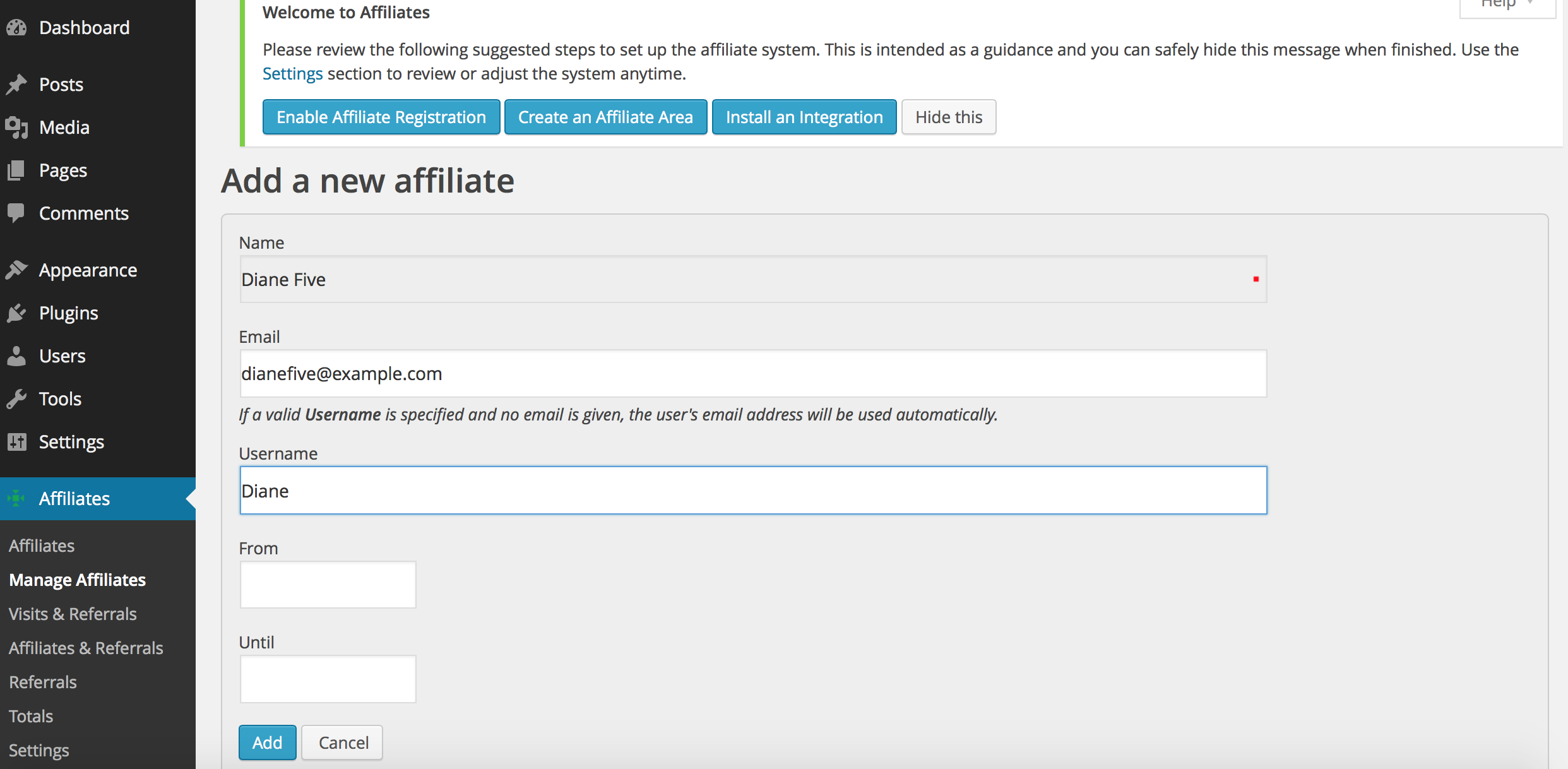
Adding a new affiliate
To manually add a new affiliate go to Affiliates > Manage Affiliates and click New Affiliate.
Fill out at least the Name of the new affiliate, you can leave the rest empty or provide the Username if the affiliate already has a user account. You can also add a user account later if desired. If you provide a Username the email associated to the user account will be used as the affiliate’s email.
The From date will be set to the current date automatically, leave it empty unless you would like to enable the affiliate at a certain date.
Click Save to create the new affiliate.
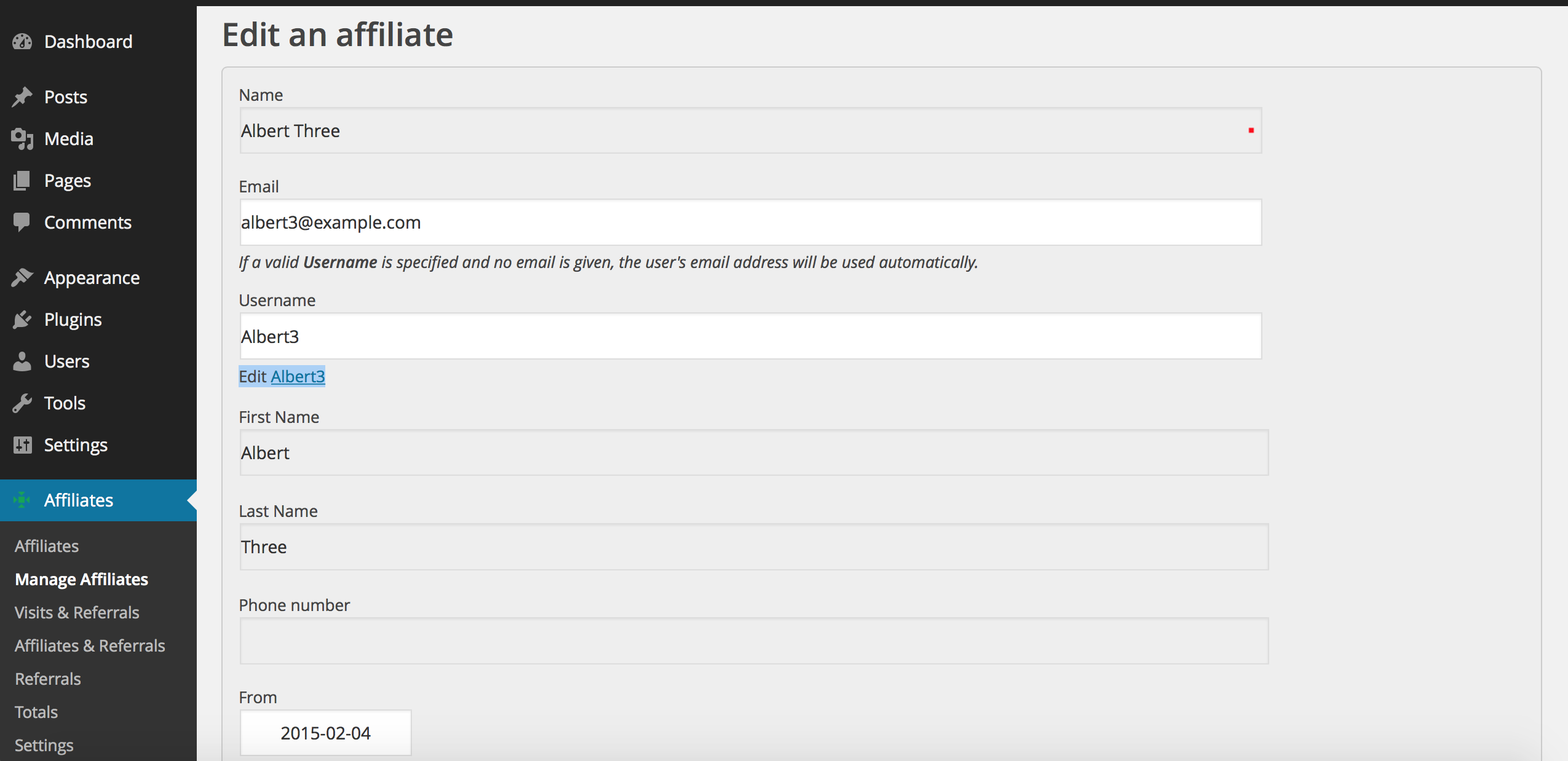
Editing an affiliate
To edit an existing affiliate go to Affiliates > Manage Affiliates and click the Edit icon, here you can modify the email address, the user name or the validation dates.
The same basic options apply when a new affiliate is added.
The option “Edit username” allows you access to edit the user information.
You can now define affiliates attributes.
Removing affiliates
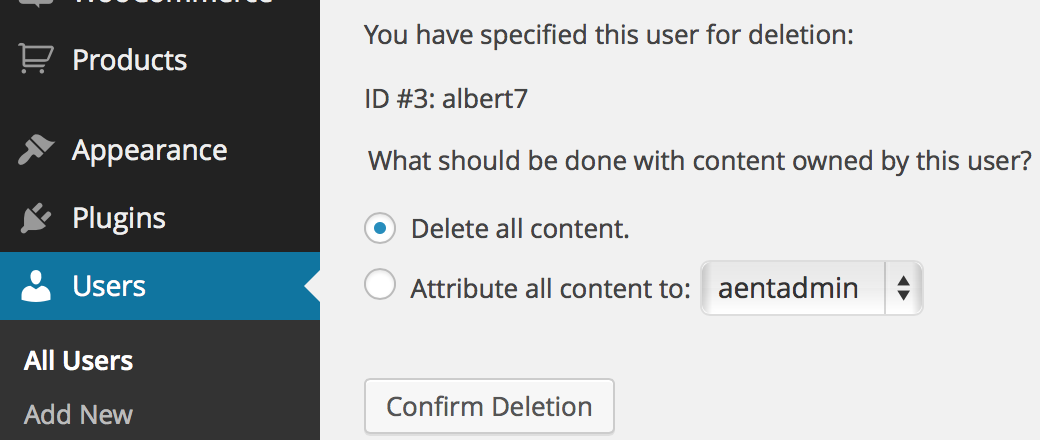
To remove an affiliate go to Affiliates > Manage Affiliates and click the Remove icon for the desired affiliate. Confirm your decision by clicking Remove.

Note that you have removed albert7 as an affiliate of your affiliate program database.
In this case, the same user cannot register again.
If you also need to remove him as a user, go to your WordPress Users menu and click the Delete button.
If you simply want to invalidate an affiliate so that the affiliate will not be credited with referrals anymore, you can set the appropriate Until date by editing the affiliate. This will retain information displayed for that affiliate and the affiliate will still appear in the affiliate listing when the Include inoperative affiliates filter option is checked.