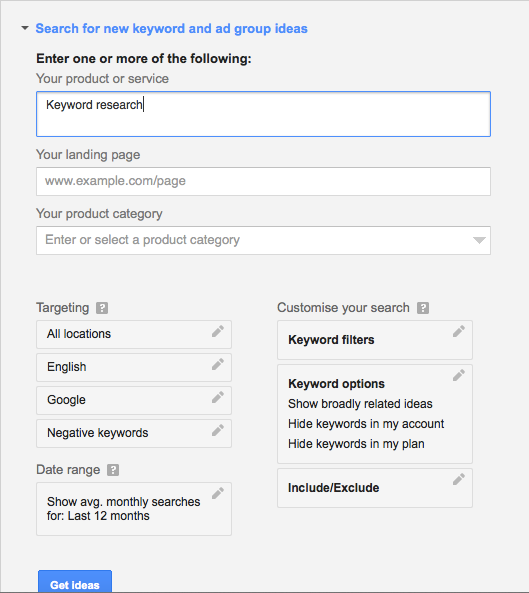
This is what the homepage of Keyword Planner tool looks like. All you need to do is enter your target Keyword that you want to start searching for. After that, you can add filters such as for which country you want to target your keywords (In below example, All location is selected).
1) Enter your product or services:
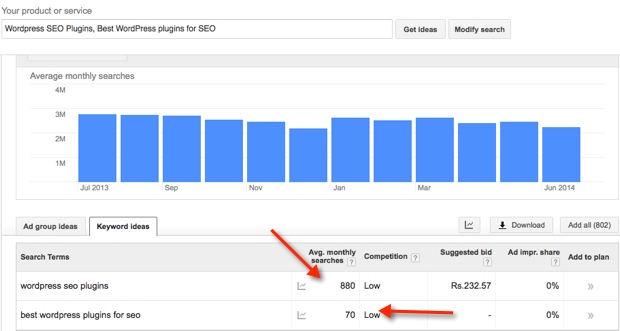
This is the place where you will put your target Keywords. For example, my next post in on Keyword research, and I’m not sure what keyword I should be targeting that post for, I will do some searches based on my knowledge like you see in the example, and it shows me results globally and local search. The idea here is to find a Keyword that has good traffic but
low competition. If you are working on a blog for the long-term goal, you can also
target high competition Keyword, using resource pages. For ex:
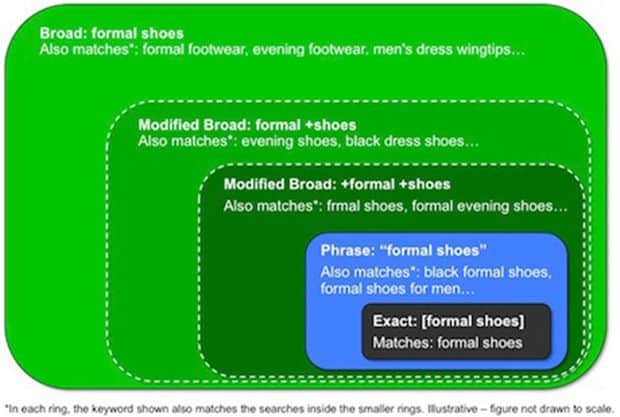
WordPress guide. It makes take time before you see your keyword ranking at the good position. Below image illustrates the difference between
Broad search, Exact search and phrase search.
2) Search type:
This is one important column that you should be taking care of. There are three options for search type:
Exact Match: Exact searches, shows the traffic for exact match Keyword. For example, if you search for WordPress SEO in exact match, it will be different from broad search in a great way. My suggestion, prefer Exact search when you are doing research for your
micro-niche site and broad search when you are writing on the personal blog. Ex:
Keyword Research Broad Match: Broad Match is my favorite, as it let me target long-tail keyword, and your traffic is not limited to exact match words. For Bloggers, broad match is useful, but that again depends on your blog type and target. Ex: “
Keyword-based research”
Phrase: Phrase type is useful when you need Keyword in an exact phrase. For example: “Best Keyword Research”. Keyword position won’t be changing, but it gives the data for traffic, that your Keyword might be getting for phrase search.
3) Advanced option and filter:
This feature is set to add more filters to your search. For example Country search volume, Language and target device (Computer or mobile devices). Depending upon your target audience, you can set everything including the category.
4) Understand Keyword tool column:
Notice the pointer 4 in the above image and now, understand the meaning of each column.
- Competition: Just to clear one myth about this tool, competition field doesn’t show how hard and easy it’s to rank for that Keyword. In fact, it shows the competition among advertisers bidding on that keyword. So, if you see “low” for a great keyword, mark it and later we will see how we can easily analyze the competition.
- Global monthly search: Global monthly search shows the average of search happened in last 12 months globally.
- Local monthly search: It shows the search volume based on your filter. For example, in above image, I have applied filter for U.S as country and notice the huge difference between global and local search volume.
- Approximate CPC: This column shows approx. CPC (Cost per click), for an advertiser. Many SEO gurus recommend to use this column to find AdSense CPC Keywords It’s a good idea to pick high CPC keywords, where advertisers are bidding more but with low competition.
For this tutorial, let’s keep it simple and let’s keep our example for broad search type.
Performing Keyword research using Google Keyword tool:
I hope this must have given you a basic understanding of Keyword tool by Google works, and now, we will move to real deal here. Our target is to find some low competitive but high-medium traffic Keyword using
Google search, Google Keyword research tool,
SEMRUSH &
LongTailPro.
We will be using SEMRUSH or LongTailPro to analyze the competition of a keyword. Basically, this would help us determine how easy or difficult it is to rank for a certain keyword.
Now, before we start here is a quick question:
What one of these is better?
Getting 100 untargeted visitors or 10 targeted one?
If your answer is “Targeted”, then don’t leave those keywords with low traffic. Since it’s relevant to your niche, in longer run it will help you. Make sure to check “Google traffic trend” too, which will help you to check your target keyword traffic pattern over the time.
Discover Keyword using Google Instant search:
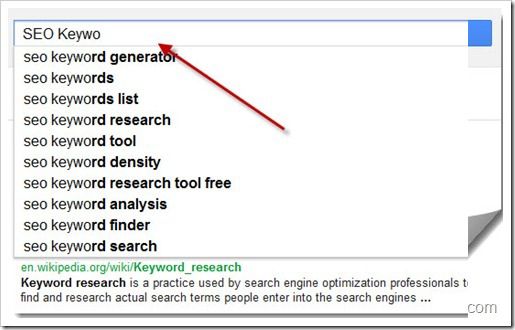
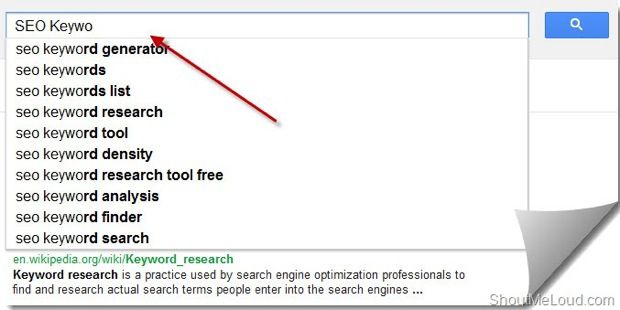
Google instant search is my first basis of finding a perfect Keyword. It’s more like a Keyword discovery tool, which you can use to generate tons of ideas. Though you can’t use all of them, but for initial step, it’s good to brainstorm some ideas for K/w research. Put any Keyword related to your niche, for example; I started typing “SEO Keywo” and Google Instant search suggested search results. Depending upon your post type, you can pick a couple of them which make sense to you. Look at this screenshot:
Once you have found 3-4 such Keywords, start adding it to Google Keyword suggestion tool and perform a search. So I picked two keywords from the list: “SEO Keyword Search” & “SEO keyword research” as both are similar and make sense for my niche, and I can come up with a post on that. Now next step is to find if these two Keywords are going to do any benefit regarding traffic, or just going to be another article with not much value from traffic POV.
Let’s move on to the next step:
Keyword search analysis:
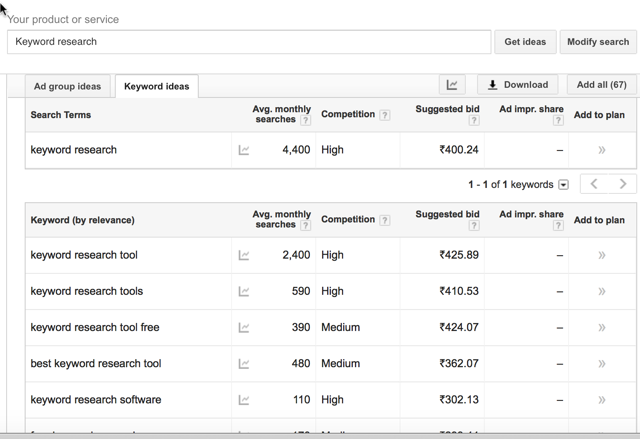
Now, I will put both the Keywords in search tool and perform a search, it will give me details for search type I’m performing and also show relevant Keyword ideas. Now, that is keyword goldmine for you, as it will let you find many relevant Keywords that you can target in the same post or else can come up with a follow-up post.
I usually target 2-3 Keywords/post. You can create your SEO strategy depending upon your post quality and length. So, for the information sake, we have selected only Two keywords as shown in above picture, and it’s time to check, which one of them is less competitive. Before that, you can change your filter to see if your target Keyword has any exact match type or not.
Checking Keyword competition using SEMRUSH:
Once you have identified the keyword, next thing is to check the keyword competition, or you can call it ‘Keyword difficulty.’ This is just to measure how difficult it is to rank for a certain keyword.
I usually use
SEMRUSH for checking the keyword competition & it is also handy to find related keywords that I usually place around the post. Let me explain what I meant by an example.
I searched for a Keyword “SEO Keywords” in
SEMRUSH tool & this is the result that I got.
In the above screenshot, you can see Keyword with their variation along with volume. On the right-hand side, you can see the related Keywords which is not so different, but it varies a lot when you are researching keyword for the different niche.
Note: Do pay attention to Column call CPC. This is useful for anyone who is using
AdSense to make money from their blog. The higher the CPC for any keyword is & if you rank higher in search engine for that keyword, you are more likely to earn huge/click from Adsense. I have talked about this in
detail here.
Back to the above screenshot, clicking on view full reports would show detailed information about all keywords. First, have a clear look at the below screenshot:
I have highlighted Keyword competition column with the red box. Though; this detail is for advertisers, but it would give you a good idea of what Keyword you should target.As you can see here, according to competition checker tool, “meta keywords SEO” is easier to rank.
If you are looking something from a blogger/publisher point of view to rank a post, then use LongTailPro.
LongTailPro shows competition based on factors such as domain age, the number of backlinks, on Page SEO, page rank,
DMOZ submissions,
Domain authority& few other significant factors. You can also click on “view details” to see more detailed results for your competitor. Here is a detailed competition report for my target Keyword: (For first top 10 results)
Do remember when writing an article or making a post keyword targeted, you need to have Keywords in your Title, description, and H1 tag. Take care of keyword density, LSI keyword, add videos & few other signals.
We have discussed this in-depth over here.
Along with above-mentioned points, backlink and social media promotion are one major factor for better ranking. Also, my suggestion for you is always to ensure you domain expiry date is not before next three years.
What next?
So now, we have one keyword with us, and similarly, you can find many keywords related to your niche. It might be the little time-consuming, but it’s worth more than spending un-targeted ten posts. Now, your next target should be writing a
Keyword optimize article (SEO copy-writing), and you can refer to our earlier guide on
OnPage optimization.




READ HERE-: HOW TO CREATE MICRO NICHE BLOG TRICKS
ReplyDeleteREAD HERE-: HOW TO CREATE MICRO NICHE BLOG AND EARN 500$ IN A MONTH TRICKS
ReplyDelete